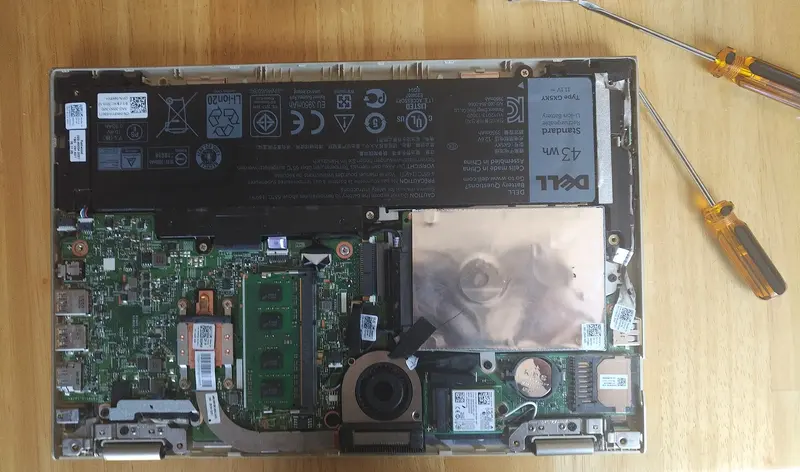
January is when many people decide a laptop has had its day — it's slow, the battery barely lasts, a key has stopped working, or the January sales make a new one tempting. Sometimes replacement is the right answer. But a laptop that is kept in use for longer is the simplest kind of reuse there is, and a repair can be the cheaper option.
Recycle Your Electricals, the national campaign run by the not-for-profit Material Focus, puts it as a question: "Before recycling, selling or donating your old electricals – how about getting them fixed?"
Is it still under guarantee?
Start with what you are entitled to. If a laptop is fairly new and has developed a fault, Citizens Advice says that "if something's gone wrong with an item you've bought, you might be entitled to a refund, repair or replacement". Its pages set out the rules for England, with separate advice for Wales, Scotland and Northern Ireland.
Recycle Your Electricals also points out that a faulty device may be covered by the manufacturer, who could repair or replace it. Check the warranty and the receipt before you pay for a repair yourself.
Where to get a laptop repaired
Recycle Your Electricals' page on laptops and computers suggests asking the manufacturer, the retailer or a local computer repair shop, and says that "instead of buying a new computer or the accessories, a repair could save you money". Its repair page lists repair networks, guides and charities, including the Restart Project.
Community repair events are another route. The Restart Project, a registered charity, "helps people learn how to repair their broken electronics, and rethink how they consume them in the first place". It runs free community repair events, called Restart Parties, where volunteers help people fix broken or slow devices, and lists events in other parts of the UK too. Repair cafés in many towns work in a similar way. They usually help you fix the item yourself rather than taking it away, so you keep hold of your data.
What is often worth fixing?
Not every fault is worth repairing, and a repairer can tell you honestly. In general, problems with parts that are designed to be replaced are the most likely candidates:
- a battery that no longer holds its charge
- a slow hard drive — swapping it for a solid-state drive is a common upgrade on older machines
- not enough memory, on laptops where it can be added
- a broken screen, keyboard or charging port
- software problems, where a clean reinstall can make an old machine usable again
Many newer, thinner laptops have parts soldered in place, which makes some of these harder. The maker's service manual, or a repairer, will tell you what can be changed on your model.
If your laptop runs Windows 10 and can't upgrade, a repair won't change that. See still using Windows 10? What to do with PCs that can't upgrade before spending money on it.
Your data, before it goes for repair
If you hand a laptop to someone else to repair, your files go with it. Back everything up first, and think about what is on it.
For organisations, the NCSC's secure sanitisation guidance covers this situation. It says you "may need to return a faulty device to the vendor for repair or replacement", and that before you do, you should check whether the device is encrypted. If it is, a manufacturer's factory reset that deletes the encryption keys usually gives enough assurance; if it isn't, the NCSC describes overwriting and checking the storage first. Our guide to data wiping and destruction standards explains the terms.
At home, the sensible minimum is a backup, signing out of accounts you don't want the repairer to see, and asking what the repairer does with any replaced drive — an old hard drive taken out during an upgrade still holds your data. Keep it, wipe it, or have it destroyed.
When it really is the end
If a laptop can't be repaired economically, it still has value. Recycle Your Electricals says charities "can refurbish your computer and accessories for someone who needs them", that laptops and accessories "contain precious materials that can be reused if you recycle them", and that there are more than 22,000 retailer recycling points across the UK. A removable battery should be taken out and recycled with other batteries.
See donating old laptops and phones: doing it safely and our guide to getting rid of an old computer or phone at home.
For businesses with a batch of older machines, refurbishment can be part of the same decision. Companies on Green ITAD that list refurbishment, reuse or remarketing:
Sources
- Recycle Your Electricals: Repair electricals
- Recycle Your Electricals: Recycle laptops, desktop computers and accessories
- The Restart Project (registered charity 1151286)
- Citizens Advice: Return faulty goods (England)
- NCSC: Secure sanitisation and disposal of storage media
Checked 23 November 2026.
This article is general information, not legal advice. Rules differ between England, Wales, Scotland and Northern Ireland — check with the regulator or an adviser for your situation.