More than a big laptop
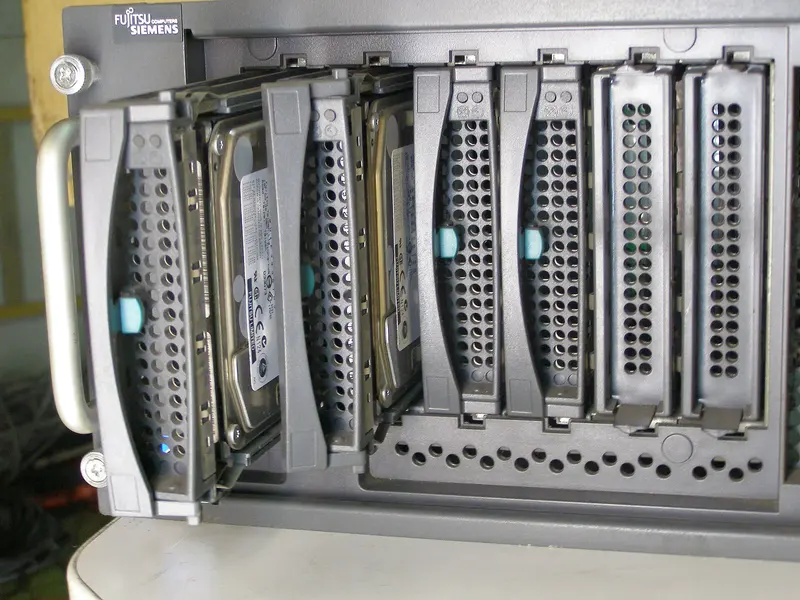
A server is often the single largest store of personal and business data an organisation owns — the NCSC notes that a laptop or server may hold several terabytes. It rarely has just one drive: there may be a row of hot-swap drives and a separate storage array, plus backup tapes or disks held somewhere else. And unlike a laptop, switching it off can break other systems.
The NCSC’s guidance on decommissioning assets (published May 2025) is a useful framework. This guide follows its stages.
Plan it
- Think about it early. The NCSC says decommissioning should be considered at the start of the procurement process. When you buy, it’s worth asking how the drives will be wiped or removed at the end.
- Find everything. List every asset involved, what it’s for and what data it processes or stores. Look out for “shadow IT” that was never on the asset register.
- Look for knock-on effects. The NCSC’s examples include a test or pre-production server that should go when its production server does, and retiring a temperature control system that could cause other equipment to overheat.
Back up — then decide how long to keep it
Before anything is switched off, the NCSC says to back up what you’d need to roll back: for a server, that includes configuration data, firewall rules and network diagrams. Test the rollback plan, or its key parts, before you start, and check that replacement systems are in place and working before doing anything irreversible.
Backups are data too. The ICO’s storage limitation guidance says you need a retention policy with standard retention periods where possible, and that when you delete personal data from a live system you should also delete it from any backup of that system. Keeping old tapes “just in case” is only justified if you can still justify holding the data on them.
Sanitise each kind of storage
The NCSC’s secure sanitisation guidance applies to every kind of storage media in a server room:
- Hard drives and SSDs. Overwrite all the user-accessible storage, check the drive’s records for remapped or bad sectors, then read the whole drive back to confirm the overwrite worked. For SSDs, manufacturers may provide built-in sanitise commands (ATA or NVMe Sanitize) to help.
- Encrypted storage. Destroying the encryption keys makes the data unreadable, but the NCSC warns that a reset of this kind can’t guarantee that every piece of user data has been made unreadable.
- Backup tapes and other magnetic media. Degaussing works only on magnetic media, and only if the degausser is strong enough for that media — check that yours is.
- Optical discs and anything that can’t be reliably erased. Destroy it.
- Where data may remain, or it was more sensitive: erase first, then physically destroy the media to particles of 6 mm or less, and check the particle size.
A drive that fails its read-back check may still hold data, so treat it as one to destroy. Our guide to data wiping and destruction standards explains the terms on quotes, such as NIST SP 800-88 and ADISA.
Keep it secure until it’s gone
The NCSC says assets that may hold sensitive data shouldn’t be kept in insecure places while they wait for the next stage. If a third party is involved, it should be appropriately certified and vetted for sensitive work, and valuable or sensitive equipment may need detailed chain-of-custody tracking as it moves. Many providers offer on-site shredding so drives are destroyed before they leave your building.
Afterwards
- Check it worked. Confirm the sanitisation was carried out as agreed — especially for any equipment that’s being reused.
- Keep the evidence. For work done by an outside company that usually means certificates listing serial numbers; record your own in-house work too.
- Update the asset register, and keep an eye out for problems you didn’t foresee.
The equipment itself is still covered by waste law once it’s surplus: a registered carrier, a permitted site and a waste transfer note, and the hazardous waste rules for things such as lead-acid batteries. See duty of care and waste transfer notes.
Leaving a cloud service
When your servers are someone else’s, you can’t shred the drives yourself. The NCSC’s cloud security principles say you should be confident that:
- your data is erased when resources are moved or re-provisioned, or when you ask for it to be erased
- storage media that held your data is sanitised or securely destroyed at the end of its life, and the provider tells you how it does this.
Deleting encryption keys (“crypto shredding”) can make data inaccessible, but the NCSC says this relies on strong encryption and a robust way of disposing of keys. It also notes that overwriting is less effective on flash storage than on magnetic disks. Look for recognised certifications, such as ISO/IEC 27001, and check that their scope actually covered secure equipment disposal.
Find companies offering data centre decommissioning, hard drive shredding or degaussing, and use the checklist for choosing a provider.
Sources
- NCSC: Decommissioning assets
- NCSC: Secure sanitisation and disposal of storage media
- NCSC: Cloud security guidance — principle 2, asset protection and resilience
- ICO: Storage limitation
This guide is general information, not legal advice. Rules differ between England, Wales, Scotland and Northern Ireland — check with the regulator or an adviser for your situation.